
Introducing Cousin Finder™: Gain DNA-Level Insights, Without a DNA Test
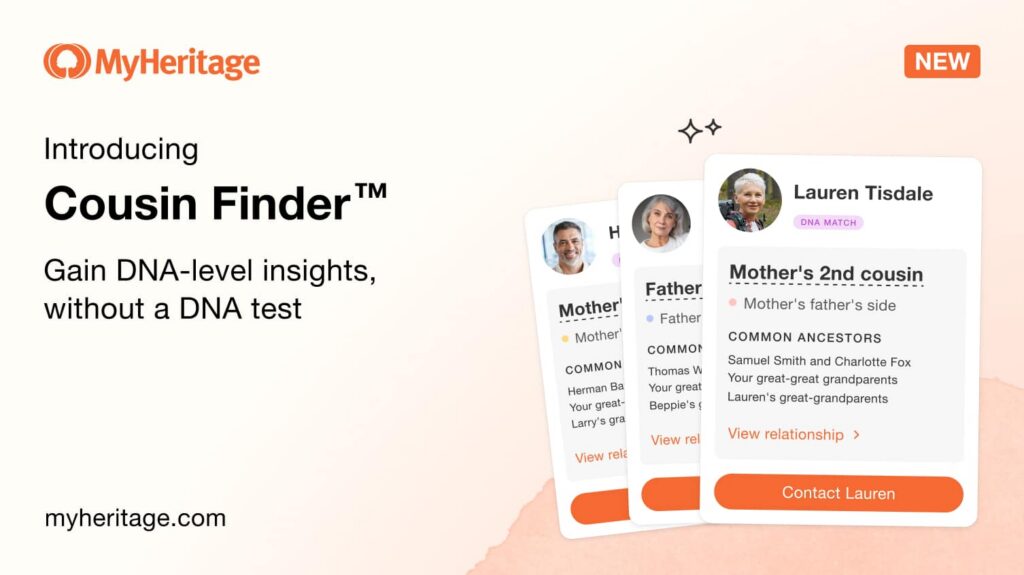
We’re happy to introduce Cousin Finder™, a useful new genealogy feature unique to MyHeritage that uses the power of family tree matches to find members of MyHeritage who are your blood relatives — cousins — with whom you share common ancestors. Cousin Finder™ then lets you easily get in touch with them so you can collaborate and gain new insights about your shared ancestors and family history.
Discover where you come from
Explore your origins and find new relatives

Think of Cousin Finder™ as a new way to find DNA Matches, but without a DNA test. The MyHeritage members that Cousin Finder™ reveals may be relatives you already knew about, but you didn’t know they use MyHeritage, and in many cases, they might be new relatives you’ve never heard of before. Unlike DNA Matches, Cousin Finder™ shows precisely how you are related to each relative. With Cousin Finder™, growing multiple branches of your family tree further has never been easier.
Cousin Finder™ is available on the MyHeritage website on desktop and when using a mobile web browser. Support for Cousin Finder™ on the MyHeritage mobile app will be added in the future. Cousin Finder™ is a free feature on MyHeritage. Additional steps, such as contacting relatives, require a subscription.
How it works
To enjoy the benefits of Cousin Finder™, you need to have a family tree on MyHeritage with Smart Matches™ to other family trees. The larger and more detailed your family tree, the better.
One of the core features of MyHeritage (if Smart Matches™ are enabled), is that it constantly compares your family tree to millions of other family trees on MyHeritage to find matching tree profiles, which are called Smart Matches™. Every Smart Match™ is an opportunity for you, or for the other tree manager with whom you match, to learn something new from each other (and sometimes both of you can learn something new from the other’s research).
Cousin Finder™ takes Smart Matches™ to the next level by automatically analyzing all of your Smart Matches™ to identify all cases where one or more of your direct ancestors appear in a matching family tree, and are also blood relatives of the site manager or of other MyHeritage members who are associated with individuals in that tree. The people with whom you share at least one common ancestor are your cousins, and Cousin Finder™ displays all those people, and gives you useful options for sorting and filtering the list. Depending on factors such as the size of your tree, the level of detail of your genealogical research (the more life events, dates and places you entered into your tree, the more you empower MyHeritage to find useful matches for you), and some degree of luck (which is always a useful ingredient in life!), Cousin Finder™ may reveal anywhere from dozens to hundreds of cousins, creating a focused list for your research.
Cousin Finder™ vs. DNA Testing
People take a MyHeritage DNA test or upload DNA data to MyHeritage from other services for various reasons. Some are interested only in learning more about their ethnic roots and where their ancestors came from. But many DNA test takers are interested in the DNA Matches, which allow them to:
- Find blood relatives they didn’’t previously know about
- Enjoy the opportunity to contact their DNA Matches and learn from them, since each DNA Match is a member of MyHeritage and isn’t an unreachable individual in some family tree or historical document
- Add more people to their family tree using information they learn from the DNA Matches
However, many of the genealogists who use MyHeritage have still not taken a DNA test. And even if you are one of the millions who have taken a MyHeritage DNA test, there are many of your cousins out there who have not. That’s exactly where Cousin Finder™ comes in! Cousin Finder™ will give you all the advantages listed in the three bullets above, without taking a DNA test. Plus, even if you have taken a DNA test, it will enable you to make new discoveries via members of MyHeritage who haven’t taken a DNA test themselves and would not come up in your DNA Matches. All this value comes from the power of family trees. Some critics may remark, and rightfully so, that family trees need to be verified, as they contain many errors and are not as strong a “proof” of a blood relationship as a DNA test. That’s correct, but it is always possible to use DNA to verify any new connection that you uncover using Cousin Finder™. In other words, think of Cousin Finder™ not as a substitute for DNA testing, but as a complement to it.
Cousin Finder™ vs. Smart Matches™
Smart Matches™ are matches between individuals in your family tree and those in the millions of other family trees on MyHeritage. While Smart Matches™ are a useful starting point for growing your family tree, they can often be overwhelming due to the huge amounts of raw data. Many users of MyHeritage find that they don’t have the time to review all their Smart Matches™ and look for all the useful information that they may glean from them, because the nuggets of genealogical gold are sometimes mixed in with large amounts of non-useful information.
MyHeritage has several features that overcome this by giving you easier ways to work with your matches. For example, last year we released Hints, a highly useful feature that presents new details from your matches within the context of an individual profile. Cousin Finder™ provides an innovative new way to crystallize the information from your matches to gain new insights. It does this by using your Smart Matches™ to extract only those people who are related to you through common ancestors, are easily contactable, and are likely to be interested in researching those common ancestors.
Using Cousin Finder™
To access Cousin Finder™, log into your account on MyHeritage, hover over the Discoveries tab on the main menu, and click Cousin Finder™.

Accessing Cousin Finder™ from the main MyHeritage navigation menu
Cousin Finder™ will spring into action and start scanning your matches to find other MyHeritage members with whom you share a common ancestor. As soon as it’s done, it will display a list of the relatives it found, sorted by proximity, i.e., those who are most closely related to you will appear first, followed by more distant relatives.

Cousin Finder™ on the MyHeritage website (click to zoom)
You can see when Cousin Finder™ was last updated on the top right of the screen. Update the results at any time by clicking “Recalculate”.
Each relative is displayed on a card. The card provides useful information to help you understand your relationship to this person and help you determine if it would be worthwhile for you to contact them. If you decide to get in touch, click the Contact button which uses the MyHeritage Inbox. The Inbox feature is easy to navigate and was recently updated for improved functionality.
To explore the types of insights you can gain from Cousin Finder™, let’s dive into the example below.
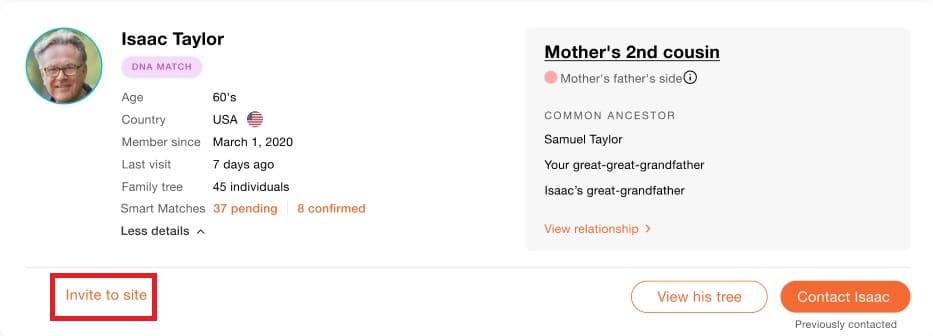
Exploring Cousin Finder™ (click to zoom)
The card displays the relative’s name, photo (if available), age, and country. You can click the relative’s name to see their profile page on MyHeritage. If you have a DNA Match with this person, a purple DNA Match label is displayed. If they are already a member of your family site, a “Site member” label is displayed. If you haven’t yet invited them to become a member of your family site, you can do so from the “Invite to site” link, marked above in red.
The card also provides useful information to help you gauge the level of activity of this person on MyHeritage and the depth of their genealogical research. It displays how long ago this user joined MyHeritage, when they last visited, the size of their family tree, and the number of photos they’ve uploaded. The date of their last visit can indicate how active they are on MyHeritage. The more recent their activity, the more likely they may be to respond once you contact them through MyHeritage. Users with a larger family tree might have more information to share with you, as they are highly interested in genealogy and potentially more committed to helping others.
As mentioned above, Cousin Finder™ is based on Smart Matches™. Click “More details” on the bottom left of the card to see the number of pending and confirmed Smart Matches™ you have with this individual’s tree. Both orange links are clickable and will take you to a page that lists all Smart Matches™ from that family tree. While Cousin Finder™ offers an easier way to understand and manage your matches, it’is also a good idea to revisit your Smart Matches™ from time to time, and if anything seems incorrect, you can reject those matches and recalculate Cousin Finder™.
Information regarding your relationship to this person appears on the right side of the card. The relationship is displayed at the top. This relationship is calculated based on available family tree data. It could be that your relationship is actually closer than this prediction suggests. Click the relationship or the “View relationship” link to open a special version of the Relationship Diagram, which shows the relationship path between you and this relative.
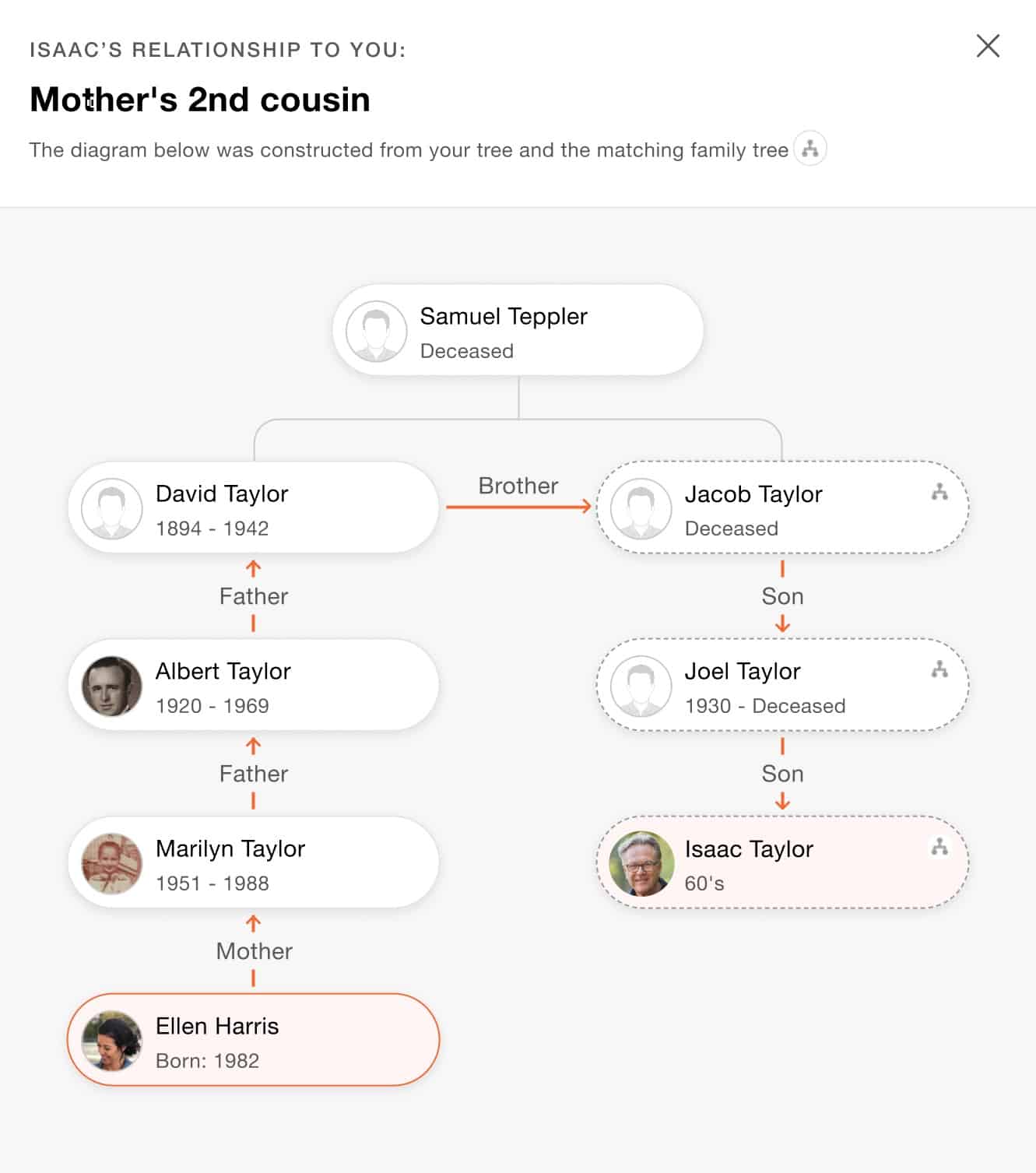
Relationship Diagram (click to zoom)
This Relationship Diagram is special in that it is not solely constructed based on your family tree, but from a combination of your family tree and the matching family tree that produced the Smart Match™ through which this relative was found. Individuals taken from the relative’s tree are indicated with a dashed border around the node and a small tree icon. These nodes are great potential additions to your family tree! You will need to do this manually. You can click any node in the diagram to show more information about the person. From the details popup, you can click “View profile” to go to the profile page for this individual, marked below in red.
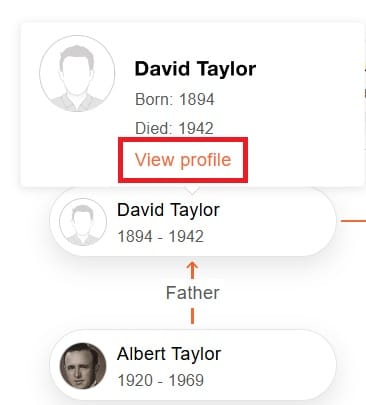
Relationship Diagram: Details popup (click to zoom)
Getting back to the main card, let’s review the information displayed on the right, below the relationship.
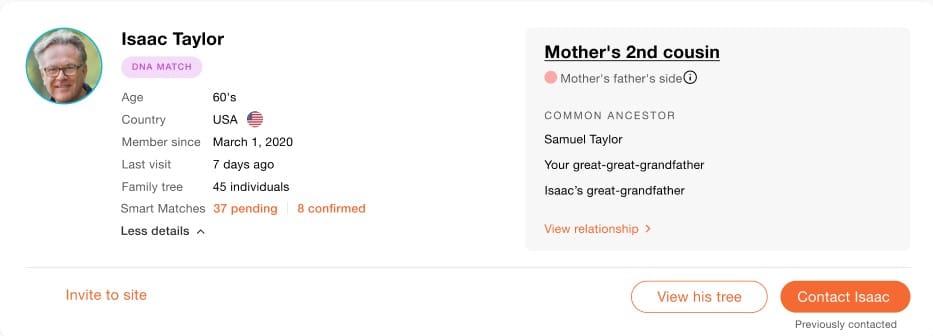
Directly below the relationship, the card displays which branch of the family this cousin belongs to, along with a color coding designation. The color coding follows the same color coding standard that we use for family trees. Click the “i” icon if you need a reminder of the color codes and the ancestral branches they represent.
Next, the card displays the names of the common ancestor(s) you and this cousin share, together with an explanation of how those ancestors are related to each of you. In the example we’re using for the relative Isaac Taylor, Cousin Finder™ shows that the common ancestor, Samuel Taylor, is your great-great-grandfather, and Isaac’s great-grandfather.
On the bottom right of the card there are two buttons: one to view the relative’s tree, and another to contact them. Getting in touch with a relative with a matching tree is an important step that can lead to breakthroughs in your research. If you’ve previously contacted the relative via MyHeritage, an indication that says “Previously contacted” will appear directly below the Contact button, as in the example below.

Contacting a relative through Cousin Finder™ (click to zoom)
Filter and Sort menus are available to configure the Cousin Finder™ results.
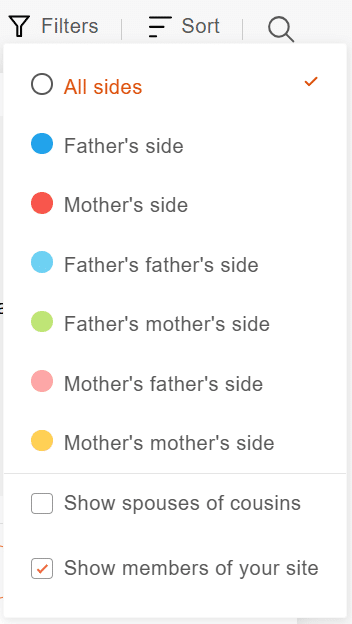
Filtering on Cousin Finder™
You can filter the list to show cousins from a specific branch of your family.
By default, Cousin Finder™ displays only your direct relatives. If you wish, you can expand the list to also show relatives through marriage by clicking “Show spouses of cousins” in the filter menu. The reason we added this is because it’s usually best to contact your cousins directly. However, if they are deceased, or not interested in genealogy, contacting their spouses might be a good alternative.
To hide all the relatives in the list that are already members of your family site (i.e. to avoid Cousin Finder™ telling you what you already know), uncheck “Show members of your site”.
The Cousin Finder™ list can be sorted two ways. The default order is by the proximity of your relationship, with the closest blood relatives appearing first. You can also sort the list alphabetically by last name followed by first name.
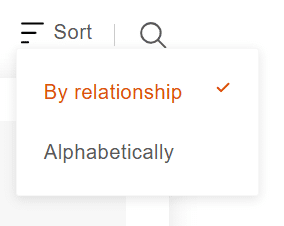
Sorting Cousin Finder™ results
Tips to get the most out of Cousin Finder™
- If you have an excellent family tree elsewhere, but not on MyHeritage, now’s the perfect time to import it to MyHeritage as a GEDCOM file and unleash the power of Smart Matches™ and Cousin Finder™ on your family tree.
- If you already have a great family tree on MyHeritage, but you disabled Smart Matching™ at any point in the past, you’ll need to enable it from your privacy settings to take advantage of Cousin Finder™. Conversely, if for any reason you don’t want anyone else to find you on their Cousin Finder™ list, turn off Smart Matches™ for your family tree in the privacy settings.
- If you have Smart Matches™ but they are few and far between, try growing your MyHeritage tree further by adding more individuals and more vital life events, dates, and places to receive more matches. Once you have more Smart Matches™, Cousin Finder™ will provide you with much more value.
- Cousin Finder™ can be very useful for sourcing relatives from branches of your family tree that you are particularly interested in, who you can encourage to take a MyHeritage DNA test (or you can offer to gift them the DNA test yourself). The benefit of testing additional relatives from a branch that interests you is that you will know the origin of all your shared DNA Matches. For example, if you found that your mother’s first cousin is on your Cousin Finder™ list and you contact them and persuade them to take a DNA test (or they agree to test and you buy it for them), you will soon receive a strong DNA Match with that person. That DNA Match will point out your shared DNA segments. Those shared DNA segments come from the shared ancestors you have with them on your mother’s side (your great-grandparents and your match’s grandparents). Now, any other DNA Match you have that you currently cannot pinpoint, who has one or more of these DNA segments (or parts of them), i.e., is a shared match for you and your mother’s first cousin, will be identified as being a descendant of those great-grandparents (or their ancestors) and you will be able to focus your research on those DNA Matches. This is based on the triangulation of DNA Matches and provides an excellent way to harness DNA to research branches of your family tree that you are most interested in researching further.
Planned enhancements
Just like any new feature, this initial release is just the beginning. We have plans to enhance Cousin Finder™ further, for example, by adding the option to send periodic email notifications to inform you when new cousins are found. If you have additional requests and ideas, please let us know in the comments below.
Summary
Cousin Finder™ is a unique feature, exclusive to MyHeritage. The credit for this innovation goes to Uri Gonen, who has been a prolific member of our Product team since 2005. Cousin Finder™ was further fine-tuned in a series of brainstorming sessions between Uri Gonen and Gilad Japhet, MyHeritage’s Founder and CEO, who also named this feature. Gilad and Uri typically collaborate on many other genealogical innovations, with contributions from and collaboration with other members of the MyHeritage Product team.
Cousin Finder™ provides an easy way to discover and get in touch with other members of MyHeritage who have the same ancestors as you. Many of the users who try this feature for the first time are delightfully surprised by how many of their cousins are already using MyHeritage, and they had no idea! By contacting them through MyHeritage, inviting them to join your family site, and potentially encouraging them to take a DNA test, you can open new doors to discoveries that may have been closed off until now, as your cousins are likely interested in exchanging information with you about your common ancestors, and maybe meeting you in person.
We hope you find Cousin Finder™ useful as you continue to make strides in your family history research.

Comments
No comments yet. Be the first!